-
-
Open Source Ideas
All too often, I have ideas which might make a cool website or iPhone app or whatever and I know I just don't have the time to build them. I'm going to post them here in the hope that someone else might find a use for them. These ideas might already be in existence, of course. I'm not claiming they are unique in any way (although some might be).
You are free to take these ideas and do whatever you like with them. Of course, if they become amazingly successful, I could do with a bigger TV...
-
Operations: A Maths Game
Operations
1+ players
The aim is to get the highest number possible after using each of your tokens.
There is 1 die
Each player has 4 tokens with different symbols on:
+−×÷Each player rolls the die and the number they get is their starting number.
Lowest score starts. If there's a draw, youngest of those starts.
Each round:
- Roll the die
- Choose one of your operations.
- Perform your operation with the new number and your existing number. Try to get the highest score
- Discard your operation token. You only get to use each operation once.
Note: When the calculation is a division with a remainder, you can either discard the remainder or continue with decimals, depending on who is playing.
Example game:
2 players.
A rolls 2, B rolls 3. A has the lowest starting number so they start
- Round 1
- A rolls a 4. They decide to use their
+operation. They now have 6. - B rolls a 1. They use their
÷. They still have 3.
- A rolls a 4. They decide to use their
- Round 2
- A rolls 6. They use their
×. They have 36. - B rolls 5. They use their
×. B now has 15
- A rolls 6. They use their
- Round 3
- A rolls another 6. They've already used their
×so they have to either subtract 6 or divide by 6. They use−. They have 30 - B rolls 2. They
+it. B has 17
- A rolls another 6. They've already used their
- Round 4
- A rolls another 6! Now they only have their
÷left. They have to divide 30 by 6. Now they have 5. - B rolls 3. They have their
−left. B has 14.
- A rolls another 6! Now they only have their
B wins.
Variations
- For advanced maths, add in the power and root symbols
^√ - Try to get the lowest score instead of the highest.
- Try to get the lowest score without going below zero.
-
The Great British Web App
I think I've figured out the next break-out TV competition show: The Great British Web App
Round 1: The Microsite
Each team is presented with a PSD and a Word doc. You've got 1 hour to slice up the images, mark up the content and deploy a microsite advertising an event. The judges are harsh on anyone demoing on localhost.
Round 2: The Magazine
Using the tools, frameworks and languages of your choice, design, develop and deploy a magazine-style web site with full CMS and social media share buttons.
Teams are judged on semantic markup, SEO friendliness and accessibility audit score.
Round 3: The Masterpiece
Your chance to show off. You have 4 hours to build the shiniest, scrollbar-misusing, WebGL-heavy, experimental web masterpiece possible to match the client brief "Anything, as long as it pops!".
You only get points if it's mobile-friendly and works on IE 6.
Prize
The Winners of the Grand Finale get a copy of Dreamweaver 4 and enrolled in a Coursera course on how to retrain as a baker...
Bonus Technical challenge for the celebrity edition
Rebuild a classic HTML element using the latest web technologies - implement
<marquee>using Web Components or<blink>using Web Sockets. -
PrologCSS
Seeing as both Prolog and CSS are declarative languages, I found myself wondering if it would be possible to create a mapping from one to the other. It was an interesting thought experiment that quickly found itself being turned into code.
Way back when, Prolog was actually one of the first languages I learned to program in. It had been a while since I'd last used it for anything (a chess endgame solver in high school, I think) so I looked up an online tutorial. The following example is derived from section 1.1. of Learn Prolog Now
Simple rules
If you think of Prolog facts as denoting true/false attributes of elements, you can consider every known item in a KnowledgeBase (KB) as a DOM Element. For example:
mia.Is equivalent to:
<div id="mia"></div>While
woman(mia).Equates to:
<div id="mia" class="woman"></div>You can make multiple statements about an item in the KB:
woman(jody).
playsAirGuitar(jody).
Which is mapped to:
<div id="jody" class="woman playsAirGuitar"></div>You can then represent these facts using visual attributes:
.woman {
  background: yellow;
}
.playsAirGuitar {
  border: 1px solid black;
}
The only real issue is that CSS values can’t be aggregated. If they could be, you could always use the same attribute (e.g. box-shadow) and combine them:
.woman {
  box-shadow: 1px 1px 0 red;
}
.playsAirGuitar {
  box-shadow: 2px 2px 0 red;
}
You'd want this to render two box-shadows, one with a 1px offset and one with a 2px offset.
Instead, you have to use a unique CSS attribute for each class of facts. However, for the simplest examples, It’s not too complicated...
If you want to query the KnowledgeBase, you need to map a standard Prolog query such as:
?- woman(mia).Into the a different output mechanism: HTML.
The response is visualised in HTML and CSS using the following rules:
- There is an element with id "mia"
- There is a class "woman"
- The element with ID "mia" has the class "woman"
In the demo below, you can read this by verifying that the #mia div has a yellow background. Done.
Here's the complete KnowledgeBase for the first section of "Learn Prolog Now".
<!-- woman(mia). -->
<div id="mia" class="woman"></div>

<!-- woman(jody). -->
<!-- playsAirGuitar(jody). -->
<div id="jody" class="woman playsAirGuitar"></div>

<!-- woman(yolanda). -->
<div id="yolanda" class="woman"></div>

<div id="party"></div>
And here are the queries that could be answered by looking at the visual output:
?- woman(mia). Yes (the element with id="mia" has a yellow background) ?- playsAirGuitar(jody). Yes (the element with id="jody" has a solid black border) ?- playsAirGuitar(mia). No (the element with id="mia" does not have a solid black border) ?- playsAirGuitar(vincent). No (there is no element with id="vincent") ?- tattooed(jody). No (there is no CSS style for a class '.tattooed') ?- party. Yes (the element with id="party" exists) ?- rockConcert. No (the element with id="rockConcert" does not exist)More complex rules
It starts to get tricky when you have rules depending on other values such as
?- happy(jody):- playsAirGuitar(jody)
(“If jody plays air guitar, jody is happy”)
But I think some clever element nesting could handle that.
First, change the structure so that the classes/properties are on parent elements
<div class="woman">
    <div class="playsAirGuitar">
        <span id="jody"></span>
    </div>
</div>
Make properties into divs and entities into spans
Then update the structure of the rules:
.woman span {
    background: yellow;
}
.playsAirGuitar span {
    border: 1px solid black;
}
Now you can make rules dependent using the cascade. First, add the property:
<!-- happy(jody):- playsAirGuitar(jody) -->

<div class="woman">
    <div class="playsAirGuitar">
        <div class="happy">
            <span id="jody"></span>
        </div>
    </div>
</div>
Then create the rule:
.playsAirGuitar .happy span {
    box-shadow: 1px 1px 0 red;
}
The rule for
happy(jody)will only be true (show box-shadow) if the rule forplaysAirGuitar(jody)is also true.Conclusion
Sure, it's all a bit silly but it was quite a fun little experiment. There are probably a few big aspects of Prolog that are unmappable but I like to think it might just be possible to create a chess endgame solver using nothing but a few thousand lines of CSS.
-
Open Source Snacks
In my opinion, seed snacks are pretty much the perfect web dev snack: they're tasty, they're low-fat, they're vegan-friendly, they're gluten-free. I've always got a tub of some next to my monitor so, when I'm chewing over a tricky layout, I can grab a handful and chew them, too.
This repository collects some of my favourite seed recipes and I'm hoping that other web devs can clone the project, roast their own, suggest improvements and submit a pull request. If you have any other easy to make snacks (such as nut snack recipes), feel free to submit them, too.
Eating tips
From observation, seed eaters tend to fall into one of these categories:
Pour-and-snarf

Pour a few into your hand, tip them into your mouth in a oner. Good when you're in a hurry. Can lead to stray seeds falling into the keyboard.
Considerate Ant-eater

Pour a few into your hand, stick your tongue into the pile of seeds, retract.
Solo Ant-eater

Stick your tongue directly into the tub of seeds. Clean, efficient, not good for sharing.
Ice-cream scoop
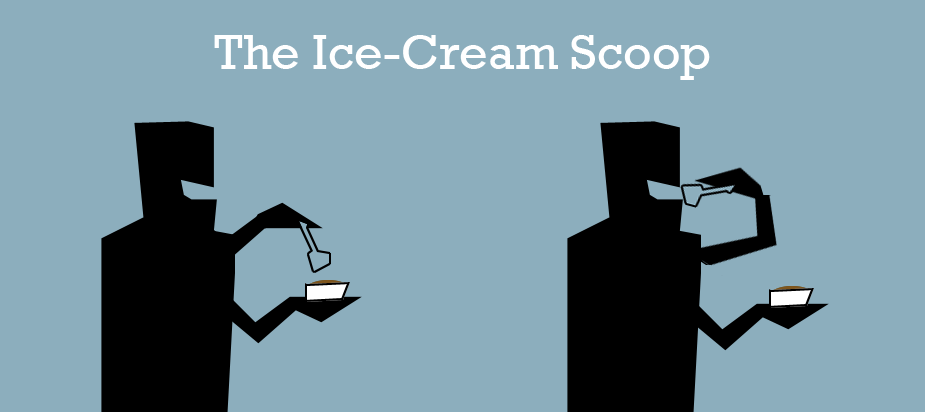
Use a spoon. Good for sharing and minimises mess. Prevents multi-tasking. Feels kind of like using your mouse to go Edit > Copy when ctrl-C is right there.
Rousing call-to-arms
The stereotypical image of the geek - bottle of cola on one side, jumbo bag of chips on the other, little desire to do anything beyond the computer - has never really been true for the majority. We're all kinds of different people - mountain climbers, cyclists, needlepoint workers, knitters. The people that played on the football team and the ones who didn't get picked. We deserve more than just nachos.
Also nachos.