At the weekend, I found myself starting another little side project that needed a map. And, predictably, I chose to use a HERE map.
In my day job, I use a lot of Vue but I do tend to prefer web components where possible, wrapping them in Vue only where necessary. This, then, is the natural outcome:
Now I can embed HERE maps with a single web component.
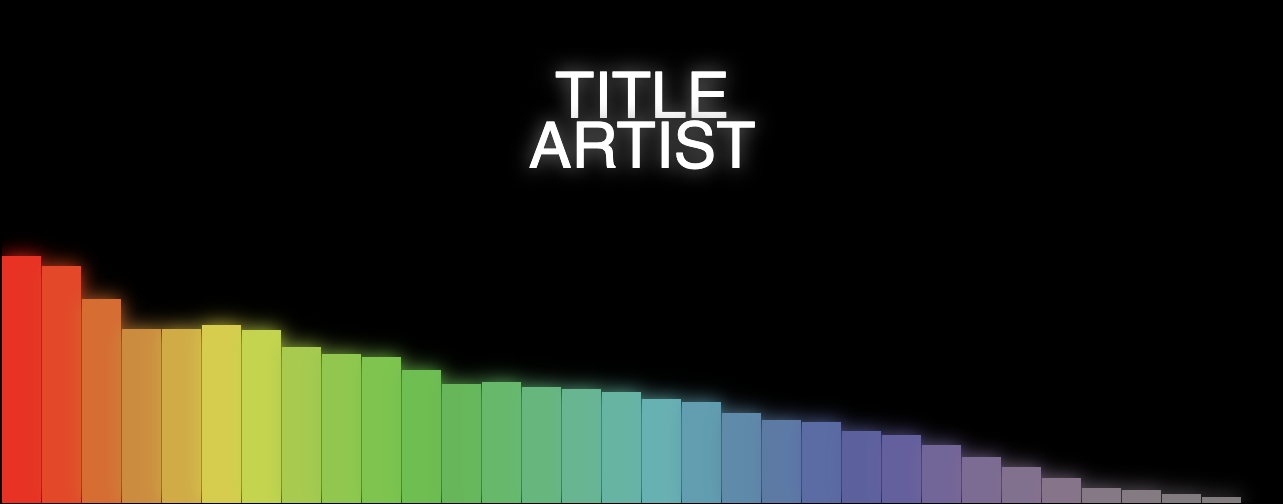
A very simple web app that generates a music visualisation from an audio file and renders it to a downloadable movie file. Most importantly, it does this all on the client side.
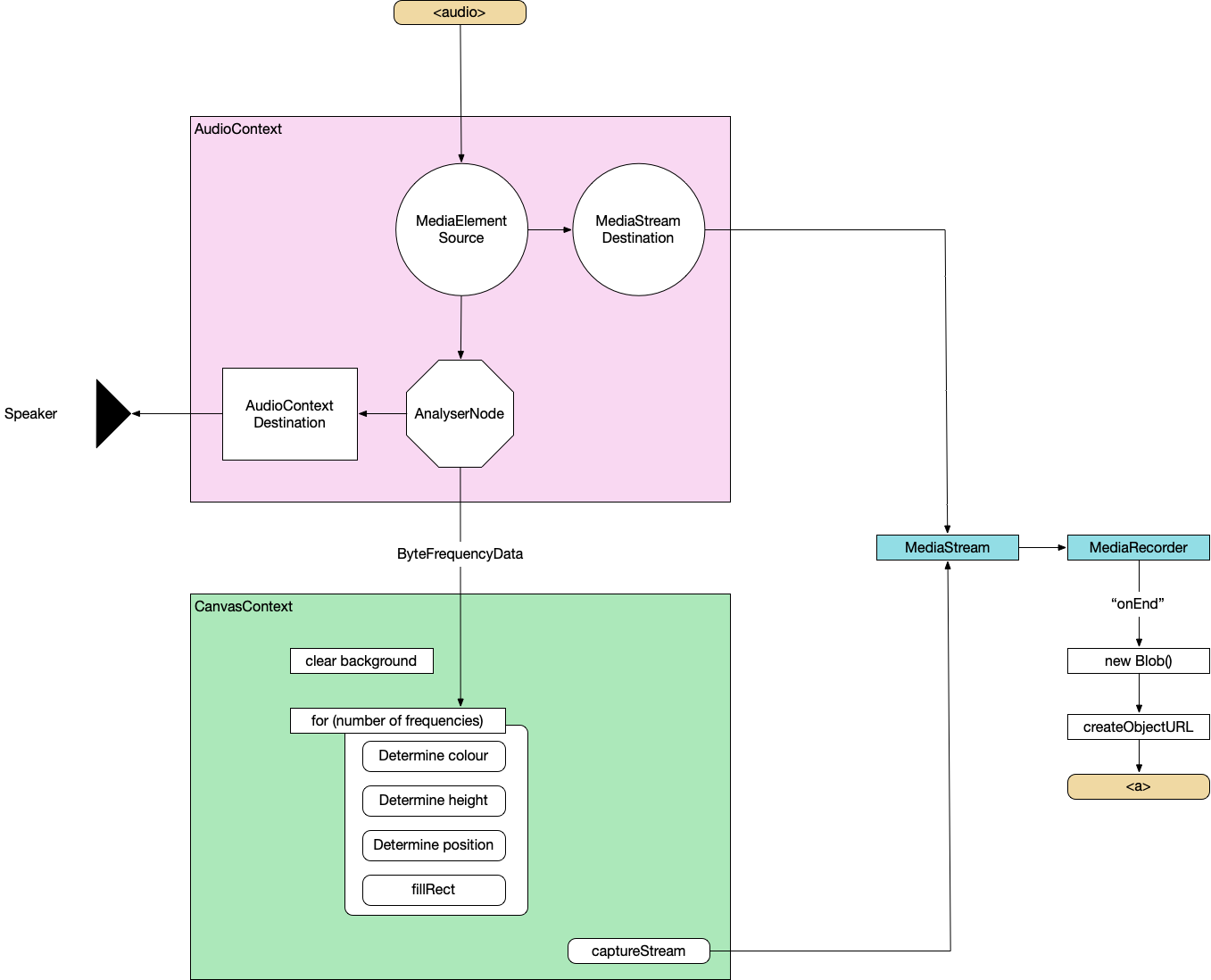
To do this, we'll combine the Web Audio API, Canvas API and MediaStream Recording API. I'll not be providing the complete source code as we go through it but just enough to point you in the right direction.
Create an AudioContext, source the audio from the <audio> element, prepare a streaming destination for later and connect the in to the out.
const context = new AudioContext();
const src = context.createMediaElementSource(audio);
const dest = context.createMediaStreamDestination();
src.connect(dest);
Attach an analyser node
We want our visualisation to react to the music so we need to wire in an AnalyserNode. Thankfully, this handles all the complicated audio processing so we don't need to worry about it too much. We also attach the analyser to the destination node of the AudioContext so that we can hear it through the computer speakers. Not strictly necessary but it's nice to be able to hear what we're doing.
the fftSize is essentially "How detailed do we want the analysis to be?". It's more complicated than that but this is all the detail we need for now. Here, we're using 64 which is very low but 512, 1024 and 2048 are all good. It depends on the actual visualisations you want to produce at the other end.
The smoothingTimeConstant is approximately "How much do we want each sample frame to be like the previous one?". Too low and the visualisation is very jerky, too high and it barely changes.
analyser.fftSize = 64;
analyser.smoothingTimeConstant = 0.8;

const bufferLength = analyser.frequencyBinCount;

// Prepare the array to hold the analysed frequencies
const frequency = new Uint8Array(bufferLength);
Finally grab the values from the <input> elements.
Now we do the standard canvas setup – grab a reference to the canvas, set our render size (doesn't need to be the same as the visible size of the canvas) and prepare a 2d context.
function renderFrame() {
  // schedule the next render
  requestAnimationFrame(renderFrame);

  // Grab the frequency analysis of the current frame
  analyser.getByteFrequencyData(frequency);

  // Draw the various elements of the visualisation
  // This bit is easy to modify into a plugin structure.
  drawBackground(ctx);
  drawBars(ctx, frequency);
  drawText(ctx, titleText, artistText);
}
function drawBars(ctx, frequency) {
  const widthOfEachBar = (canvas.width / frequency.length);

  // Loop over data array
  for (let i = 0; i < frequency.length; i++) {
    const heightOfThisBar = frequency[i];

    // Base the colour of the bar on its index
    const h = 360 * index;
    // Base the saturation on its height
    const s = 100 * (heightOfThisBar/256);
    const l = 50;
    const color = `hsl(${h}, ${s}%, ${l}%)`;

    ctx.fillStyle = color;

    // Add a little shadow/glow around each bar
    ctx.shadowBlur = 20;
    ctx.shadowColor = color;

    // Draw the individual bar
    ctx.fillRect(x, canvas.height - heightOfThisBar, widthOfEachBar - 1, heightOfThisBar);

    x += (widthOfEachBar);
  }
}
By this point, we can load a supported audio file and see some pretty pictures reacting to the music.
MediaRecorder
This section is copied almost word-for-word from StackOverflow
First, we'll create a combined MediaStream object from the audio data and the canvas data.
const chunks = []; // here we will store our recorded media chunks (Blobs)
const stream = canvas.captureStream(); // grab our canvas MediaStream

let combined = new MediaStream([
...stream.getTracks(),
...dest.stream.getTracks(),
]);
Next, we start recording that data chunk-by-chunk. We'll save it as webm.
The final video export. We convert the combined chunks (the Blob) into an object URL and create an anchor that lets us download it from the browser.
function exportVid(blob) {
  const a = document.createElement("a");
  a.download = "myvid.webm";
  a.href = URL.createObjectURL(blob);
  a.textContent = "download";
  document.body.appendChild(a);
}
This export call will be triggered after the audio has finished. You load an audio file, watch the visualisation play through, when it's finished, you click the download link and you get a webm.
So now, we have the basis for a complete music video generator – audio in, video file out.
Or watch a video generated using this basic version (as a bonus, this music was also automatically generated in the browser but that's a topic for another day):
Line-by-Line breakdowns go into excessive – and sometimes unnecessary – detail about a specific, small project. Be prepared for minutiae.
Here, I'll go through the FlatCube web component line-by-line. It is a single web component that draws a flattened-out representation of a Rubik's Cube (or other 3x3 twisty puzzle) based on a string passed in that describes the positions of the pieces. A cube contains six faces. A face contains nine pieces.
You'll probably want to have the full code open in another window to see this in context.
First, all WebComponents must extend the HTMLElement class. If you're building with a library such as LitElement, you might extend a different class but that class will ultimately extend HTMLElement.
class FlatCube extends HTMLElement {
The constructor is called every time a FlatCube element is created, not just once per page load.
constructor() {
We have to call the constructor on HTMLElement so that all the behind-the-scenes plumbing is taken care of.
NOTE: If we don't do this, we can't use this.
super();
Now set up some internal variables for the FlatCube itself. this.faces becomes an array representing the order of faces in the facelet string.
The :host CSS selector references the element itself. It's kinda like this but in CSS.
NOTE: It can only be used from inside the Shadow DOM
:host {
I want this component to be able to be used inline or as a block item so I'm specifying inline-block. If the context it ends up being used in requires it to be block, it's possible to wrap it in another element.
display: inline-block;
Skinning and scaling
In this web component, one of the main goals of the implementation was the ability to easily change the size of the component and the colours of the faces.
Luckily, CSS variables make it super easy to make components skinnable and the calc function is very useful for scaling.
The base measurement
All the dimensions – the full component width, the faces, the individual pieces – are multiples of the --flat-cube-face-width value. This is passed in from the containing CSS by specifying a value for --flat-cube-face but if it is not specified, we want a fallback of 100px.
Now the styles for the complete element. Set position to be relative so that we can absolutely position the individual faces.
.flat-cube {
  position: relative;
And specify the element to be the height of 3 faces and the width of 4. This is where the calc function comes in handy, especially in a web component intended to be reusable and seamlessly scalable.
Each face is absolutely positioned inside the containing .flat-cube element.
position: absolute;
But rather than specify exact positions for each individual piece in a face, we use flexbox to lay them out automatically. We draw the pieces in order then let them wrap onto the next line,
  display: flex;
  flex-wrap: wrap;
I wanted to specify the width of each piece as a simple ⅓ of the face width. In order to do that, I used outline rather than border as border actually takes space in the element where outline doesn't.
Using the child selector to access the pieces inside the face.
.face > div {
As I mentioned above, we want to calculate the width of the pieces simply as ⅓ of a face so we use outline. The alternative would be to calculate the pieces as (⅓ of (the face width minus 2 * the internal border width)). That sounds mistake-prone.
Again, this is just colours. We don't need to go line-by-line. The only thing to note is that each piece has a fallback colour specified in case the containing application doesn't pass one in.
And finally, we close off our template literal and end the style method.
`;
  }
Template
Now we build up the actual DOM of the element. We've done a lot of styling so far but, technically, we've nothing to apply the styles to. For that, we're going to build up the structure of faces and pieces then attach the styles.
structure() {
At this point, we have a couple of choices. We can either build this structure once and update it or build it fresh every time we need to make a change. The latter is easier to write but the former has better performance. So let's do that.
This is the createTemplate method we called in the constructor. It is called only once for each instance of the component so we don't need to go through the whole building process every time.
createTemplate() {
First, create a new template. Templates are designed for exactly this case – building a structure once and reuse it several times.
And, finally, actually create the first element that actually appears in the component. This is the div that contains everything. We also add the .flat-cube class to it.
Now we create the individual pieces. If we wanted to make this component customisable so that it could represent cubes with a different number of pieces(2x2, 4x4, 17x17, etc.), we'd use a variable here instead of 9.
for (let j=0; j < 9; j++) {
Now we call out to the preparePiece method (see below) without an element to make sure the piece has the right class assigned to it before we append the piece to the face.
By the time we get here, we have a face div with 9 piece divs appended. Now we can add that to the cube.
      cubeElement.appendChild(faceElement);
    });
Do that for each face and we have a div containing a completed flat-cube which we can append to the template.
template.content.appendChild(cubeElement);
And return the template to the constructor.
    return template;
  }
Updating
Now we have the structure in a template, we can grab a copy of it any time we need to update the cube.
updateTemplate() {
Passing true to cloneNode means we get a deep clone (containing all the nested faces and pieces) rather than a shallow clone (just the top-level element).
We're using the same method here as we did to create the individual pieces (code reuse is A Good Thing) but this time we're passing in the piece we already have rather than asking the method to create a new one.
this.preparePiece(i, j, piece);
The update variable now contains an updated DOM representing the current facelet string.
      });
    });
    return update;
  }
This method takes the i (index of the face) and j (index of the piece) we need to figure out which colour this piece needs to be. It also takes an optional argument of piece. If we don't provide that – the way we do in the initial createTemplate call – piece will be a newly created div. If we do provide that argument, we'll update whatever is passed in instead.
We have to map the facelet string – default: "UUUUUUUUU...etc" – into the two-dimensional structure of faces and pieces. Okay, technically, it's a one-dimensional mapping of a two-dimensional mapping of a three-dimensional structure. But... let's just not.
    const start = (i * 9) + j;
    const end = (i * 9) + j + 1;
This means "If we don't have a facelet string, just colour the piece according to what face it is in, otherwise, colour it according to the i,j position in the facelet string".
This is how we register the component to listen for changes. This getter returns an array listing the attributes we want to listen for.
static get observedAttributes() {
There's only one attribute we care about listening to. Any change to the facelet attribute will cause us to re-render.
    return ['facelet'];
  }
The other part of registering for changes to the attributes. This is the handler that is invoked with the name of the changed attribute (useful when you're listening to a lot of attributes), the oldValue (before the change) and the newValue (after the change).
We only care about the newValue because we've only registered a single listener and we don't need the oldValue.
this.facelet = newValue;
Then we trigger a new render to update the state of the element.
    this.render();
  }
And we close out our FlatCube class.
}
Listening for events
The final part of the puzzle is to register our new element with the browser so that it knows what to do when it sees our element. We do this by passing our new element to the CustomElementRegistry.
I like to check if my element has already been registered. Without this, including the script twice by accident will trigger an error that the user of the component isn't necessarily going to recognise.
if (!window.customElements.get('flat-cube')) {
To register, you pass the tag name you want to use and the element class.
NOTE: tag names for custom components must contain a hyphen.
  customElements.define('flat-cube', FlatCube);
}
And that's it. Every line looked at and, hopefully, explained.
Let me know what you would have done differently or if there are any (ideally small) projects you'd like me to look at line-by-line.
On recent web app projects in HERE Tracking, I've been using a layered component structure that fits particularly well with frontends that access and interact with JSON APIs.
The primary reason for structuring our apps this way is that it gives us a lot of freedom in our workflow and still fits well within the larger HERE structure with horizontal design teams that align across the multiple products. This works as a way to enable parallel contributions from everybody across the engineering teams.
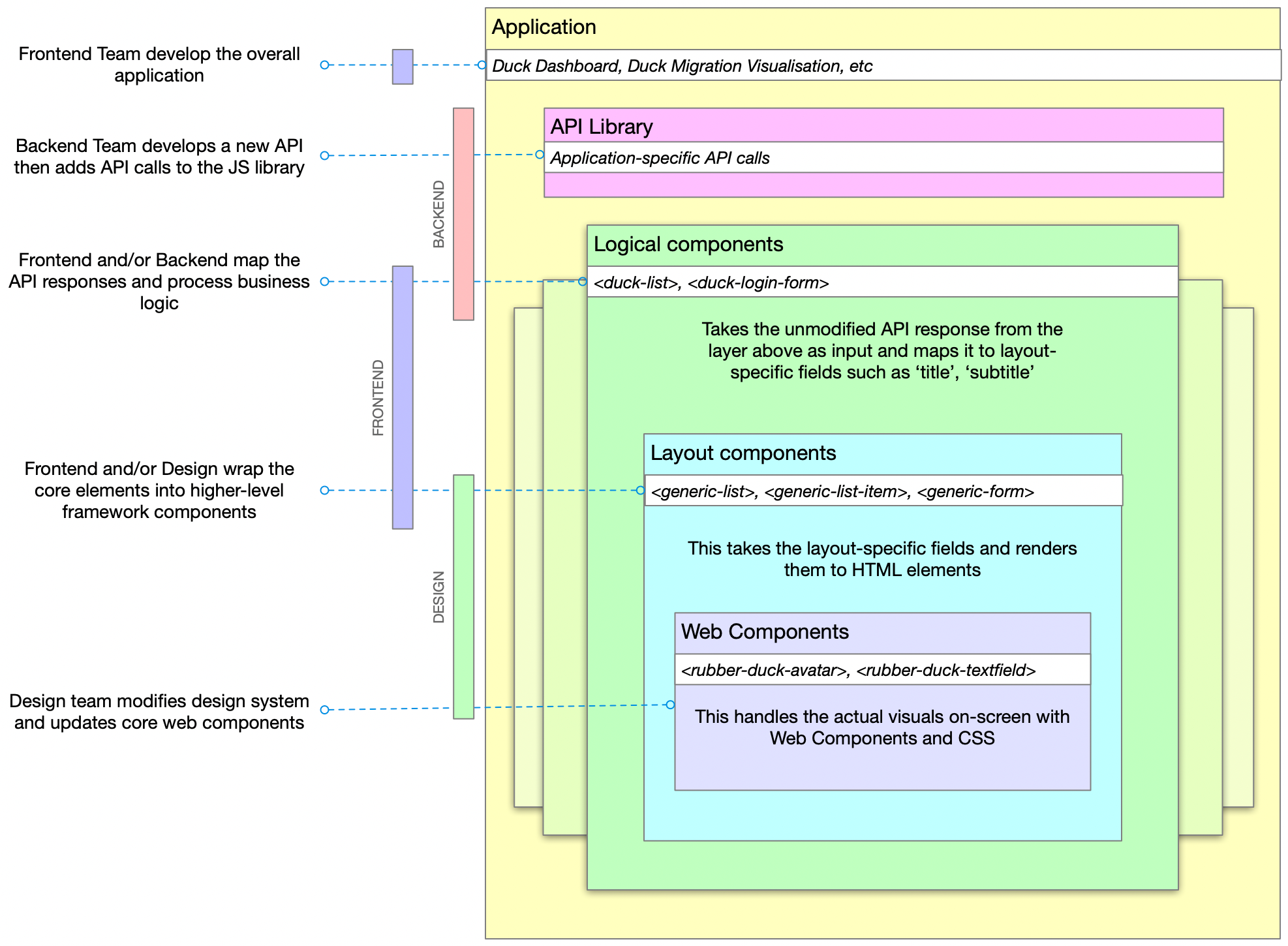
The layers are:
Application
Library (JS library to access the API)
Logical (maps business objects to layout concepts)
Layout (renders layout components)
Components (low level elements and design)
And, generally, these layers are within the areas of expertise of the Backend, Frontend and Design specialists.
It shouldn't be necessary to say this but just to make sure I'm not misunderstood: it's important to note that none of these roles is limited to the scope below, this is just a general 'areas of expertise' guide. See my previous post about shared responsibilities.
Backend teams create the API and implement the JS library. If possible, also implement the basic logical component which performs whatever business logic is required.
Frontend teams build the application out of components, further maintain the logical components and the mapping between logical and layout components
Design teams implement the core web components and company-wide design system of UX, UI, mental models, etc. This layer can also be based upon an open-source design system such as Carbon or Material.
Of course, the backend team can modify the web components if they have the inclination just as the design team couuld make improvements to the database if they are able to improve the product.
Example
NOTE: The example below is mostly Vue-like but this layered approach doesn't rely on any framework, language or coding style. It's a way to split and share responsibilities.
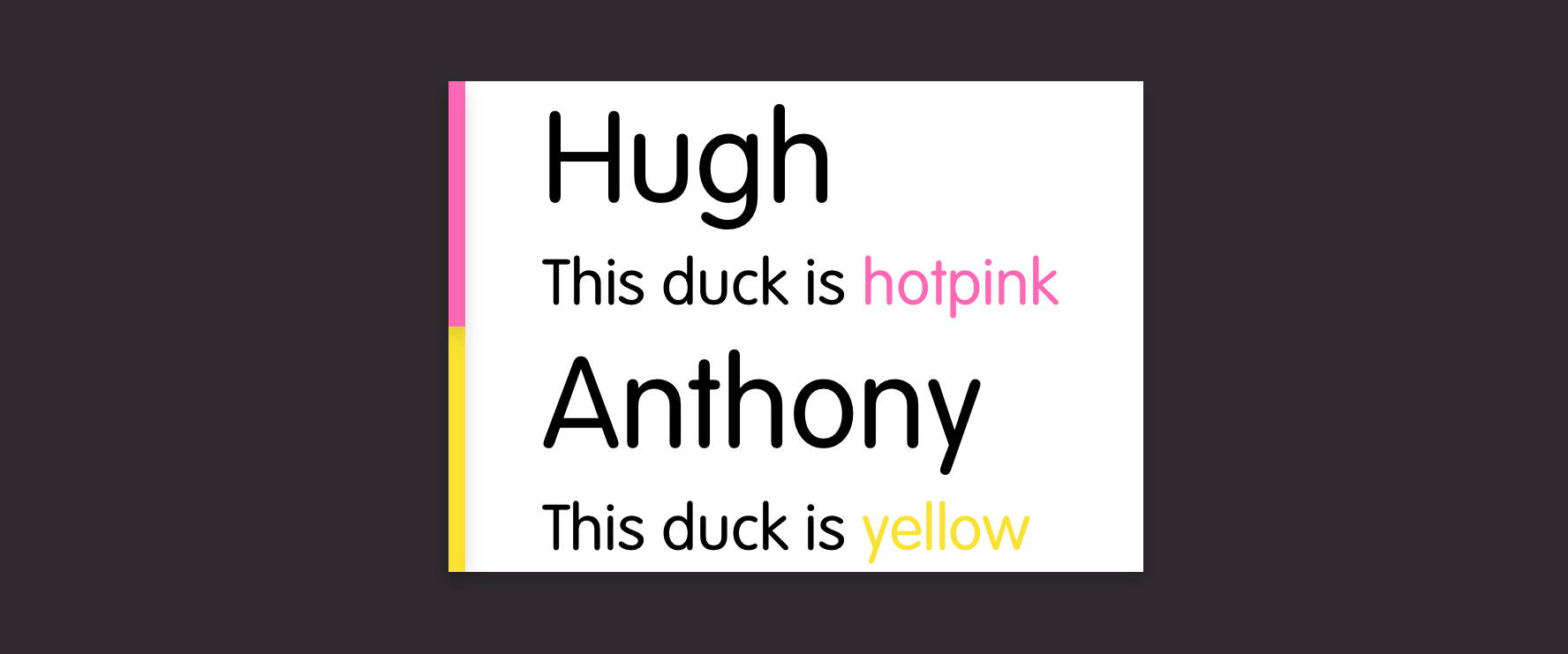
Rubber Duck Inc. make GPS-enabled rubber ducks. They have a dashboard where customers can see the location of their ducks. The dashboard includes an overview list of ducks.
Backend
The Backend team extend the Duck definition (stored in their duck-ument database) to include a new 'icon' field then update the GET /ducks endpoint that allows you to receive a list of all the ducks you own.
They check to see if the JS library needs updating (if they are using automated code generation, this might already be done). It doesn't, it already returns the full data array of the response:
The data is rendered in the web app using a logical web component
<duck-list :ducks="ducks"/>
The engineer digs one step deeper (into the 'logical' or 'application components' library) and sees that the duck-list component wraps the generic-list component but with a few modifications to the data structure.
In a parallel task, the frontend specialist can be improving the generic-list component. This component doesn't do much except create a set of generic-list-item elements.
<template>
  <ul>
    <generic-list-item for="item in items" :item="item">
  </ul>
</template>
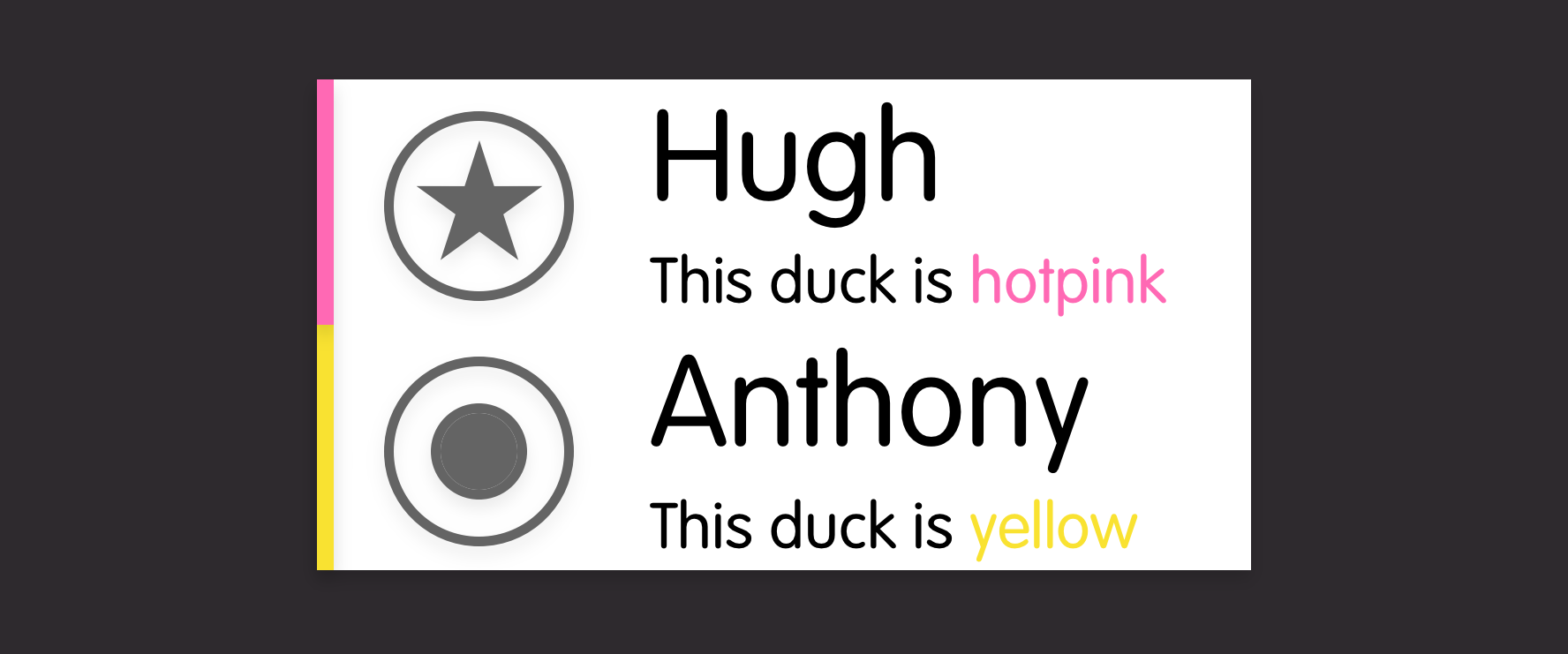
Each generic-list-item is built from basic web components from the company's DuckDesign language:
So close, except the alignment's not quite right... Frontend has a chat with design and they decide that, while this could be solved in the generic-list-item component (or even in the duck-list or the application layer), having an icon next to a title is a more generic requirement so it should be solved in the lowest design component layer:
Design tweaks the alignment of the rubber-duck-avatar component and deploys it company-wide to all product teams. Every team benefits from the shared library, the DuckDashboard team gets to show off their new duck icons, everybody helped complete the product story and nobody got hurt.
Conclusion
Admittedly, this does lead to having multiple individual repositories for a single application
dashboard-app
duck-api.js
dashboard-components
layout-components
duck-design-web-components
But it does give each team the flexibility to contribute beyond their core area and not be blocked by other teams.